Are you thinking about buying a new laptop but feel overwhelmed by all the options out there? Choosing the right laptop can be confusing, especially when you don’t know the differences between types.
What if you picked one that doesn’t fit your needs or budget? You deserve a device that works perfectly for your daily tasks, whether it’s for work, gaming, or just browsing. Keep reading, and you’ll discover the main types of laptops available.
This will help you make a smart choice that matches your lifestyle and saves you time and money.

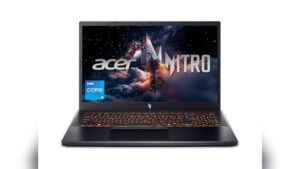
Credit: www.amazon.com
Laptop Categories
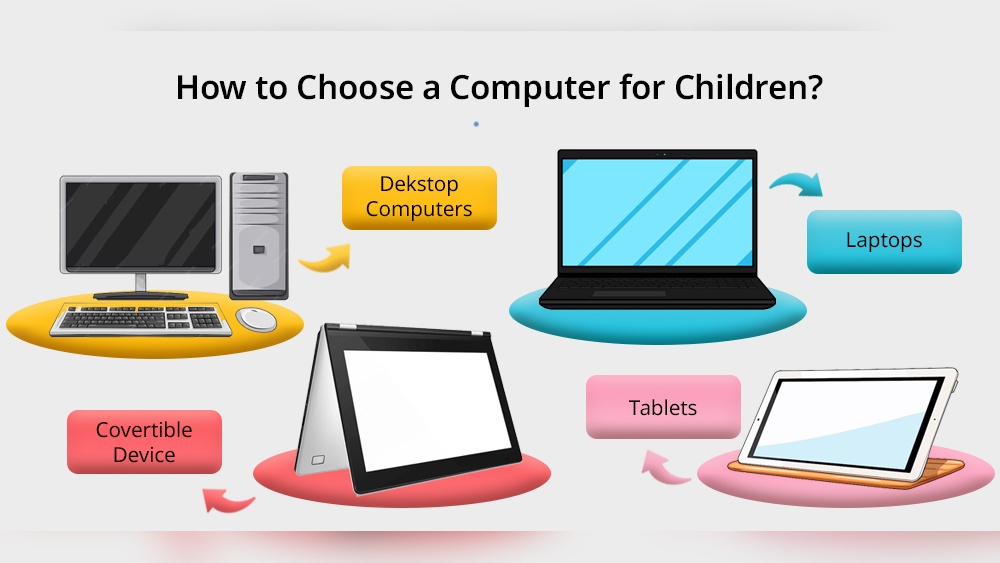
Laptops come in many types, designed for different needs and tasks. Choosing the right one depends on what you want to do. Each category has unique features that suit specific uses. Understanding these types helps you pick the best laptop for work, study, or play.
Traditional Laptops
Traditional laptops are versatile and widely used. They have a screen, keyboard, and touchpad in one unit. These laptops suit daily tasks like browsing, writing, and watching videos. They offer a balance of power and portability. Many models have various screen sizes and price points.
Ultrabooks
Ultrabooks are thin and light laptops. They focus on speed and battery life. These laptops use solid-state drives (SSD) for faster performance. Ultrabooks are easy to carry around. They often have sleek designs and high-resolution screens.
2-in-1 Convertibles
2-in-1 convertibles can switch between a laptop and a tablet. The screen can rotate or detach from the keyboard. These laptops offer flexibility for work and entertainment. They support touch and pen input. Ideal for creative tasks and note-taking.
Gaming Laptops
Gaming laptops have powerful processors and graphics cards. They handle demanding games smoothly. These laptops often feature larger screens and better cooling systems. They come with high refresh rate displays for better visuals. Gaming laptops are heavier but deliver strong performance.
Business Laptops
Business laptops focus on security and reliability. They offer long battery life and robust build quality. These laptops include features like fingerprint scanners and privacy screens. Designed for professionals who travel or work remotely. They prioritize data protection and connectivity.
Chromebooks
Chromebooks run on Chrome OS and rely on the internet. They are lightweight and affordable. These laptops work well for browsing and using cloud apps. Chromebooks have simple interfaces and fast startup times. Ideal for students and casual users.
Workstation Laptops
Workstation laptops are built for heavy tasks like video editing. They have powerful CPUs and professional graphics cards. These laptops support large amounts of RAM and storage. Workstations are used by engineers, designers, and creatives. They provide high performance and durability.
Traditional Laptops Features
Traditional laptops have been a popular choice for many years. They offer a familiar experience with a full keyboard and screen. These laptops suit daily tasks like browsing, writing, and watching videos. Their features balance power, portability, and price.
Design And Portability
Traditional laptops have a clamshell design. The screen and keyboard fold together. They come in various sizes, from small 13-inch models to larger 17-inch versions. Weight varies but most weigh between 3 to 6 pounds. This makes them easy to carry in bags or backpacks. Their thickness is more than ultra-thin laptops but still slim enough for travel.
Performance And Usage
These laptops use mid-range processors suitable for everyday tasks. They handle office software, web browsing, and streaming smoothly. Some models can also run light photo editing and casual games. RAM usually ranges from 4GB to 16GB. Storage options include hard drives or faster solid-state drives. Traditional laptops rarely support heavy software for professional work.
Battery Life
Battery life varies widely by model and use. Most last between 4 to 8 hours on a single charge. This suits work or school days with moderate use. Some models offer quick charging features. Heavy tasks like video editing reduce battery time. Users often carry chargers for long days away from power outlets.
Ultrabooks Benefits
Ultrabooks offer many benefits that make them popular among laptop users. They combine style, performance, and portability in one device. These laptops are perfect for people who want a fast and easy-to-carry machine. Below are some key benefits of ultrabooks.
Slim And Lightweight Build
Ultrabooks are very thin and light. They fit easily in bags and backpacks. This makes them great for travel and daily use. Carrying an ultrabook feels comfortable, even for long hours. Their sleek design also looks modern and professional.
Power Efficiency
These laptops use less power than regular laptops. They run longer on battery without needing to charge. This helps you work or watch videos for hours. Power efficiency also means less heat and quieter performance. It saves energy and improves user experience.
Ideal Users
Ultrabooks suit students, office workers, and travelers. People who need a portable device with good speed benefit most. They are perfect for simple tasks like browsing, writing, and video calls. Ultrabooks meet everyday needs without extra bulk or weight.
2-in-1 Convertibles Advantages
2-in-1 convertibles combine the features of a laptop and a tablet. They offer great flexibility for users. These devices suit many tasks and environments. Their unique design lets you switch between modes easily. Many people choose them for work, study, and entertainment.
Touchscreen And Stylus Support
Most 2-in-1 convertibles have a touchscreen. This feature makes using the device more interactive. You can tap, swipe, and zoom with your fingers. Many models also support a stylus. A stylus helps with drawing and taking notes. It feels like writing on paper, but digital.
Flexible Modes
These laptops change shape to fit different needs. You can use them as a traditional laptop. Or fold the keyboard behind the screen to use as a tablet. Some models stand in tent mode for presentations. This flexibility makes them useful in many situations.
Best Use Cases
2-in-1 convertibles work well for students and artists. They are great for people who travel a lot. Their light weight and flexibility make them easy to carry. Business professionals like them for presentations and meetings. They suit those who want both a laptop and tablet in one.
Gaming Laptops Specs
Gaming laptops have special features that help run games smoothly. These laptops need strong parts to handle heavy games without slowing down. Knowing their key specs helps choose the best one for your needs.
Graphics And Processing Power
Good graphics cards make games look clear and detailed. Many gaming laptops use NVIDIA or AMD graphics chips. These chips show game worlds with smooth images and bright colors.
The processor is the laptop’s brain. Intel and AMD offer powerful processors that run games fast. A strong processor stops games from freezing or lagging.
Display And Refresh Rate
The screen size and quality affect your gaming experience. Most gaming laptops have screens between 15 and 17 inches. A bigger screen helps see game details better.
Refresh rate means how many times the screen updates per second. A higher rate, like 120Hz or 144Hz, shows smoother motion. This is important for fast games that need quick reactions.
Cooling Systems
Gaming laptops get hot during long play sessions. Cooling systems keep the laptop from overheating. Fans and heat pipes move heat away from key parts.
Some laptops have advanced cooling with extra fans or liquid cooling. This helps keep performance steady and prevents shutdowns.
Credit: www.cdw.com
Business Laptops Essentials
Business laptops are designed to meet the needs of professionals. They offer features that enhance productivity and protect important data. Choosing the right business laptop helps you work efficiently and securely. These laptops balance power, security, and connectivity for daily tasks.
Security Features
Security is key for business laptops. Many models come with fingerprint scanners or facial recognition. These protect your device from unauthorized access. Some laptops have built-in encryption to keep files safe. Trusted Platform Module (TPM) chips add an extra layer of security. These features guard sensitive business information.
Durability And Build Quality
Business laptops are built to last longer. They use strong materials like metal or reinforced plastic. This helps them survive drops and bumps. Many meet military standards for durability. Spill-resistant keyboards and sturdy hinges improve reliability. These features reduce the risk of damage during travel or daily use.
Connectivity Options
Good connectivity is essential for business laptops. They often include multiple USB ports for accessories. HDMI or DisplayPort allows easy connection to external screens. Some models offer Ethernet ports for stable wired internet. Wi-Fi 6 support ensures fast wireless connections. These options keep you connected at work or on the move.
Chromebooks Highlights
Chromebooks are laptops that run on Chrome OS. They focus on speed, simplicity, and security. These devices are great for daily tasks like browsing, emailing, and using web apps.
They offer a different experience from traditional laptops. Chromebooks rely mostly on cloud storage and online tools. This makes them lightweight and easy to use.
Operating System And Apps
Chromebooks use Chrome OS, a system made by Google. It is fast and updates automatically. Most apps run inside the Chrome browser or from the Google Play Store.
This means many popular apps like Google Docs and Zoom work well. Offline use is possible but limited compared to other laptops.
Affordability
Chromebooks are usually less expensive than Windows or Mac laptops. Their hardware is simple, which lowers the cost. This makes them a good choice for tight budgets.
You get decent performance without paying too much. The focus is on value and efficiency, not high-end specs.
Target Audience
Chromebooks suit students and casual users best. They are ideal for people who use mostly web-based tools. Also, they work well for those who need a basic, easy laptop.
Business users needing complex software might find them limiting. But for everyday tasks, Chromebooks are practical and fast.
Workstation Laptops Strengths
Workstation laptops have many strengths that set them apart from other types. They are built to handle tough tasks and run demanding programs smoothly. These laptops are ideal for users who need reliable power and steady performance every day.
Designed with strong parts and advanced technology, workstation laptops deliver consistent results. They support complex work, making them a key choice for professionals in many fields.
High-end Performance
Workstation laptops use powerful processors and large amounts of memory. This lets them run heavy software without slowing down. They also have strong graphics cards for detailed images and videos. These laptops can work on big projects quickly and efficiently.
Specialized Software Support
Many workstation laptops come with drivers that support special software. This software includes 3D design, video editing, and engineering tools. These laptops often get certified by software makers to ensure smooth use. This means less trouble and better results for users.
Typical Users
Engineers, designers, and video editors often choose workstation laptops. Scientists and architects also rely on them for complex tasks. These users need laptops that handle big files and run demanding programs well. Workstation laptops meet these needs with ease.
Choosing The Right Laptop
Choosing the right laptop can be tricky. Different laptops fit different tasks and users. The goal is to pick one that matches your daily needs. This helps avoid spending on features you won’t use.
Consider what you mainly use your laptop for. Work, school, gaming, or casual browsing? Knowing this guides your choice. Some laptops offer power but cost more. Others are simple and affordable. Balance is key.
Assessing Your Needs
Think about the tasks you perform often. Simple tasks like email and web browsing need less power. Creative work like video editing needs a strong processor and good graphics. Gaming requires high performance and fast display. Also, consider the size and weight if you travel a lot. A light laptop is easier to carry.
Budget Considerations
Set a clear budget before shopping. Laptops come in many price ranges. High-end models have many features but cost more. Budget models cover basic needs well. Decide what features are must-haves and what you can skip. This saves money and prevents overspending.
Future-proof Features
Choose a laptop with some extra power for future needs. More RAM and storage help the laptop last longer. Look for newer processors and updated ports. This keeps your laptop useful for years. Avoid models that feel outdated quickly.

Credit: acemagic.com
Frequently Asked Questions
What Are The Main Types Of Laptops Available?
The main types of laptops include ultrabooks, gaming laptops, 2-in-1 convertibles, business laptops, and budget models. Each type serves different user needs, from portability to high performance.
Which Laptop Type Is Best For Gaming?
Gaming laptops are best for gaming. They have powerful GPUs, high-refresh-rate screens, and advanced cooling systems for smooth gameplay.
Are 2-in-1 Laptops Suitable For Everyday Use?
Yes, 2-in-1 laptops combine tablet and laptop features. They offer versatility for work, entertainment, and casual browsing.
What Makes Business Laptops Different?
Business laptops focus on security, durability, and productivity features. They often include enhanced connectivity and longer battery life.
Conclusion
Choosing the right laptop depends on your needs and budget. Some laptops focus on power, while others on portability. There are models for work, gaming, or casual use. Think about what you will do most often. This helps pick the best option for you.
Remember, each type has strengths and limits. Take your time to compare features and prices. A good choice makes your daily tasks easier and more fun. Keep these points in mind when buying your next laptop.