Choosing the best fitness application for iPhone can feel overwhelming. There are hundreds of apps, each promising unique features and better results. But which ones truly stand out for people at different fitness levels? Whether you want to lose weight, build muscle, track your runs, or just stay healthy, the right app can make a big difference.
Let’s explore the top fitness apps for iPhone, what makes them special, how they compare, and how you can pick the perfect fit for your own goals.
What Makes A Great Fitness Application?
Before diving into the best choices, it’s important to understand what sets a top fitness app apart from the rest. Here are some key features and factors:
- Ease of use: Simple navigation and clear instructions are essential, especially for beginners.
- Variety of workouts: Good apps offer a range of activities—strength, cardio, yoga, HIIT, and more.
- Personalization: The best apps adjust workouts to your fitness level, goals, and preferences.
- Tracking and analytics: Seeing your progress in graphs and numbers keeps you motivated.
- Integration: Syncing with devices like Apple Watch, heart rate monitors, or other health apps is a big plus.
- Community support: Challenges, leaderboards, and social features help you stay consistent.
Many people overlook the importance of motivation and habit-building tools in fitness apps. These features—like reminders, streaks, and rewards—are often what make users stick to their routines long-term.
Top Fitness Applications For Iphone
Let’s look at the most popular and highly rated fitness apps available for iPhone users. Each offers something unique, so you can find the one that matches your needs best.
1. Apple Fitness+
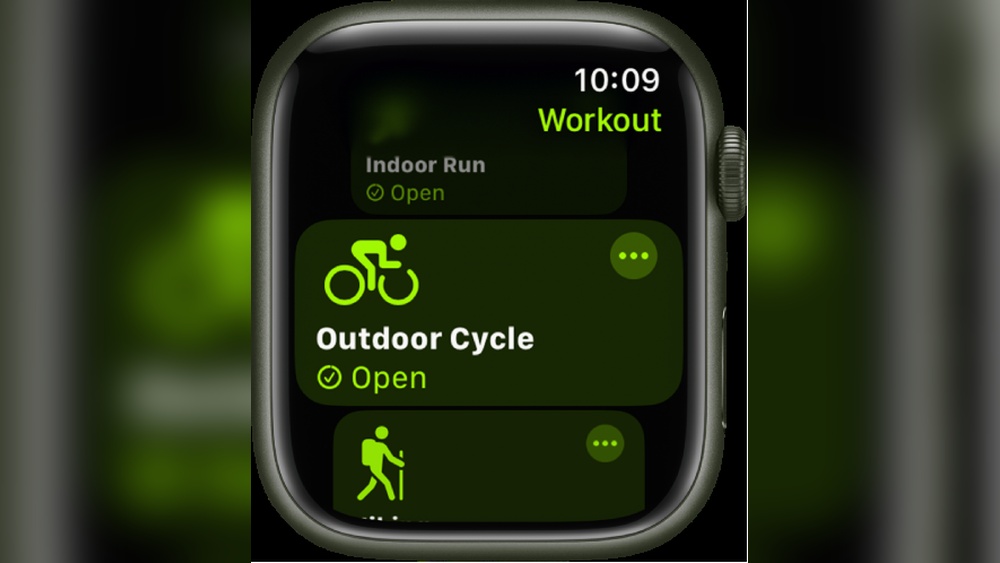
Apple Fitness+ is designed specifically for iPhone, Apple Watch, and other Apple devices. It offers a wide range of classes—HIIT, yoga, cycling, strength, and more—led by expert trainers. The workouts are updated weekly, and you can filter by time, trainer, and music style.
What sets Apple Fitness+ apart is its integration with Apple Watch. As you work out, your heart rate, calories, and activity rings are displayed on the screen in real time. This helps you stay focused and see your progress instantly.
The app also offers guided meditations and beginner-friendly programs.
Non-obvious insight: Many beginners don’t realize how powerful the “Time to Walk” and “Time to Run” audio features can be for building a daily movement habit.
2. Myfitnesspal
MyFitnessPal is best known as a nutrition and calorie tracking app, but it’s much more than that. It includes a huge database of foods, barcode scanning, meal logging, and even water tracking. You can also connect it to other fitness apps and devices, making it a true health hub.
For fitness, MyFitnessPal lets you log workouts, set step goals, and track progress over time. Its community forums are active, with challenges and advice from users around the world.
Non-obvious insight: The “Recipe Importer” saves time by letting you quickly log homemade meals—very helpful for people who cook at home.
3. Strava
Strava is extremely popular among runners and cyclists. It uses GPS to track your routes, speed, distance, and elevation. After your workout, you can see detailed stats, compare with past performances, and even compete with others using the same routes.
Strava’s social features are a big draw. You can follow friends, give “kudos” to their activities, and join groups or challenges. This sense of community keeps many users coming back.
Tip: Use the “Segment” feature to compete on specific parts of your route—even if you’re running alone.
4. Nike Training Club
Nike Training Club (NTC) is a free app offering hundreds of workouts for all levels. You can choose from strength, endurance, yoga, and mobility sessions. Many workouts require no equipment, making it easy to exercise at home or while traveling.
NTC provides structured workout plans and expert tips. The app’s videos are clear and easy to follow, and you can filter workouts by duration, intensity, and focus area.
Mistake to avoid: Many users skip the “Programs” section, which offers multi-week plans for building consistent habits.
5. Fitbit
Fitbit started as a wearable device, but its app is now available to all users, even without a Fitbit tracker. It covers steps, sleep, heart rate, workouts, water intake, and even mindfulness exercises.
The Fitbit app is very user-friendly, with colorful graphs and daily summaries. If you use a Fitbit device, you’ll get even more detailed data, including sleep stages and stress tracking. The app also offers challenges and virtual badges to motivate you.
Insight: The “Sleep Score” feature can help you link sleep quality with workout performance—a connection many people miss.
6. Peloton
Peloton is best known for its cycling classes, but the app offers much more—running, strength, yoga, meditation, and even outdoor workouts. You don’t need the famous Peloton bike to use it; all classes are available on iPhone.
Peloton’s trainers are energetic and motivating, and the app’s music playlists are excellent. Live and on-demand classes let you work out at your own pace. The leaderboard feature adds a competitive element, but you can hide it if you prefer to focus on your own progress.
Practical advice: Try the “Programs” for structured, goal-based training over several weeks.
7. Jefit
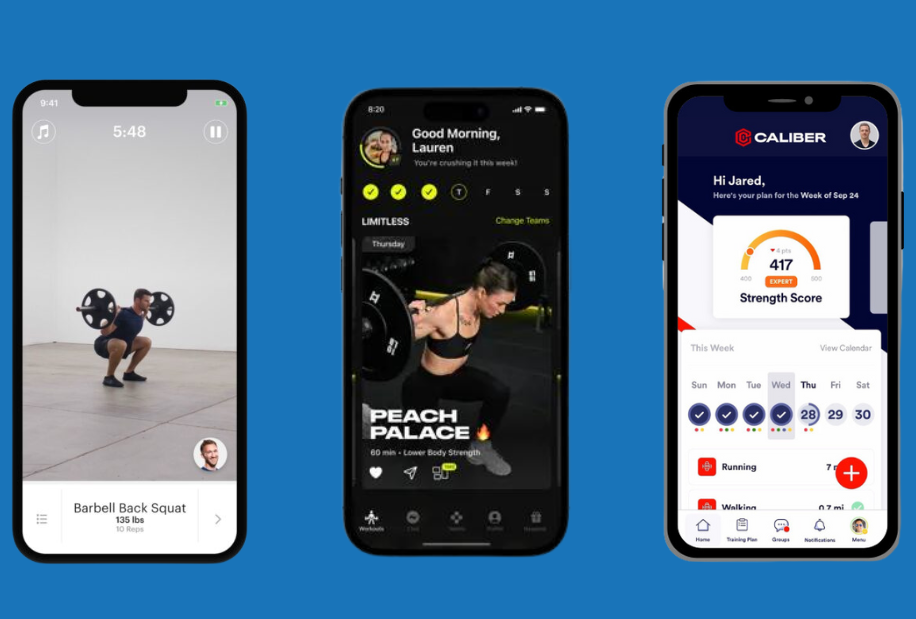
JEFIT is focused on strength training and bodybuilding. It offers a huge database of exercises with detailed instructions and animated demonstrations. You can create custom workout routines, log sets and reps, and track your progress over time.
JEFIT’s analytics are very detailed, making it easy to see improvements in strength and muscle size. The community features allow you to share routines and get feedback.
Advanced tip: Use the progress photos feature to visually track muscle growth—not just the numbers.
8. Freeletics
Freeletics uses artificial intelligence to create personalized bodyweight workouts. You answer a few questions about your fitness level and goals, and the app designs a training plan just for you. No equipment is required for most workouts.
The app’s audio coaching and motivational messages help you push through tough sessions. Freeletics focuses on short, high-intensity workouts, so you can fit exercise into a busy schedule.
Mistake to avoid: Many users skip the fitness assessment at the start—this makes your program less accurate.
9. Centr By Chris Hemsworth
Centr offers a holistic approach to fitness, including workouts, meal plans, mindfulness, and sleep tools. The workouts cover strength, HIIT, boxing, yoga, and more—many led by celebrity trainers.
Centr’s daily planner helps you organize your workouts, meals, and meditation in one place. The recipes are practical and often require simple ingredients.
Insight: The “Mindfulness” section is often overlooked but can help reduce stress and improve workout results.
10. Fitbod
Fitbod is perfect for people who want personalized strength training plans. The app uses machine learning to create workouts based on your goals, available equipment, and recent activity. Each session is tailored to avoid overtraining and promote balanced muscle growth.
You can log exercises easily, see your progress, and get tips on form. Fitbod’s recommendations improve as you use the app more.
Pro tip: Review the “Muscle Recovery” map to make sure you’re not overworking the same muscle groups.
11. 8fit
8fit combines fitness and nutrition for a complete health solution. It offers personalized workout plans—mostly bodyweight—plus meal planning and recipes. Workouts are short (10-20 minutes) and easy to fit into a busy day.
The nutrition section is detailed, with portion sizes and grocery lists. 8fit is especially good for beginners who want simple, clear guidance.
Beginner mistake: Ignoring the meal planner leads to slower progress—use both fitness and nutrition features for best results.
12. Mapmyrun By Under Armour
MapMyRun is popular among runners and walkers. It tracks routes, distance, pace, and calories burned using GPS. The app also includes training plans for 5K, 10K, and marathon distances.
You can save favorite routes, analyze your pace trends, and join challenges. MapMyRun connects with many devices, including Apple Watch.
Advanced use: Create custom interval workouts to improve speed and endurance.
13. Stronglifts 5×5
StrongLifts 5×5 is focused on a simple but powerful weightlifting program—five sets of five reps for three main exercises per session. The app guides you through each workout, logs your progress, and tells you when to increase the weight.
The straightforward approach is great for beginners who want to build strength quickly. The app also includes instructional videos and a timer for rest periods.
Tip: Use the built-in warm-up calculator to reduce injury risk.
14. Sweat By Kayla Itsines
Sweat is designed mainly for women, with programs for beginners to advanced athletes. It offers guided workouts in strength, HIIT, yoga, barre, and more. The app’s structure makes it easy to follow a multi-week plan.
Sweat includes meal ideas and a supportive community. The trainers are experienced and offer lots of motivation.
Insight: The “Progress” section lets you compare photos, weights, and measurements for a clear view of your journey.
15. Aaptiv
Aaptiv delivers audio-based workouts for running, strength, yoga, and more. Each session is led by a trainer who gives instructions and encouragement through your headphones. This lets you focus on movement instead of looking at your screen.
Workouts are available for all fitness levels, and new sessions are added weekly. The music is curated to match the workout intensity.
Common mistake: Skipping the warm-up and cool-down audio—these help prevent injuries.
16. Runkeeper
Runkeeper is another popular GPS-based app for runners and walkers. It tracks routes, distance, speed, and calories. You can set goals, join challenges, and get audio updates during your run.
The app’s training plans are adjustable for all levels, from beginners to marathoners. Integration with Apple Health and Apple Watch is seamless.
Pro tip: Use the “Shoe Tracker” to know when it’s time to replace your running shoes.
17. Daily Yoga
Daily Yoga offers guided sessions for all levels, from beginners to advanced. The app includes hundreds of classes, pose libraries, and meditation tracks. You can join global challenges and follow multi-week programs.
Sessions range from 5 to 70 minutes, so it’s easy to fit yoga into your schedule. The community forum is helpful for questions and motivation.
Beginner insight: Use the “Pose Library” to learn correct form before starting new routines.
18. Alltrails
AllTrails is perfect for outdoor lovers. It provides maps, GPS tracking, reviews, and photos for thousands of hiking, running, and biking trails worldwide. You can filter trails by difficulty, length, and user ratings.
The app helps you discover new places for outdoor workouts and keeps you safe with offline maps.
Advanced tip: Use the “Lifeline” feature to share your location with friends while hiking solo.
19. Sworkit
Sworkit is all about flexibility. You can choose workout length (from 5 to 60 minutes), type (strength, cardio, yoga, or stretching), and even customize exercises. The app creates a workout for you on the spot.
Sworkit is great for busy people who need quick, effective sessions. It also includes options for kids and beginners.
Mistake to avoid: Many users don’t explore the “Stretching” routines, which can help prevent injuries.
20. Zombies, Run!
Zombies, Run! Adds fun to your workouts by turning running into a game. As you run, you hear audio stories and missions—sometimes you need to speed up to escape zombies! The app tracks your distance and pace, and you can collect items for your virtual base.
This gamified approach helps many users stay motivated, especially those who find normal running boring.
Insight: Try the interval training missions for a real cardio challenge.

Credit: www.gymshark.com
How The Top Fitness Apps Compare
With so many options, it helps to see how the leading apps stack up in key areas. Here’s a comparison of some of the most popular fitness applications for iPhone:
| App | Main Focus | Personalization | Free Version | Best For |
|---|---|---|---|---|
| Apple Fitness+ | Classes (HIIT, Yoga, Strength) | High (integrates with Apple Watch) | No | Apple device users |
| MyFitnessPal | Nutrition & Workout Tracking | Medium | Yes | Diet-focused users |
| Strava | Running & Cycling | Medium | Yes | Outdoor athletes |
| Nike Training Club | Strength, Cardio, Yoga | Medium | Yes | General fitness |
| Peloton | Live & On-demand Classes | High | Yes | Home workouts |
Choosing The Right Fitness App For Your Goals
Selecting the best fitness application for iPhone depends on your personal goals, preferences, and lifestyle. Here are some tips to help you choose:
- Define your goal. Do you want to lose weight, build muscle, run a race, or just get healthier? Pick an app that matches your main focus.
- Consider your experience level. Beginners may prefer apps with clear instructions and gradual plans, like Nike Training Club or 8fit. Advanced users might like JEFIT or StrongLifts 5×5.
- Decide on workout location. If you mostly exercise at home, choose apps with bodyweight routines or minimal equipment needs. For outdoor activities, Strava and AllTrails are excellent.
- Check device compatibility. Some apps work better with Apple Watch or other wearables. Make sure your devices sync well.
- Look for motivation tools. Features like reminders, streaks, challenges, and social sharing can keep you on track.
Data-driven Results
To see how these apps impact real users, let’s look at some statistics:
- According to a 2023 survey, over 60% of iPhone users who downloaded a fitness app exercised more regularly within the first three months.
- Users with social or challenge features in their app were 30% more likely to stick with their routine after six months compared to those without.
- Customizable workout plans led to higher satisfaction, with users rating these apps 4.5 out of 5 on average.
Features That Beginners Often Miss
Some features of top fitness apps go unnoticed by new users, but can make a big difference in results:
- Progress photos: Many apps let you save before-and-after photos. This visual record is more motivating than numbers alone.
- Sleep and stress tracking: Apps like Fitbit and Centr connect fitness, sleep, and mental health. Better sleep often means better workouts.
- Nutrition integration: Combining workout and meal planning (as in 8fit or MyFitnessPal) speeds up progress.
- In-app communities: Joining groups or forums inside the app gives you support and accountability.
Challenges And Mistakes To Avoid
Even the best app won’t help if you fall into common traps:
- Skipping the setup: Take time to enter your real stats and preferences. This makes recommendations much more accurate.
- Overtraining: Apps with daily reminders can tempt you to do too much. Listen to your body and schedule rest days.
- Ignoring updates: Many apps add new features and workouts regularly. Check for updates so you don’t miss out.
- Not setting reminders: Use the app’s notification system to build consistency.

Credit: stbarthvillarental.com
Comparing Subscription Costs And Free Trials
Some fitness apps are free, while others require a subscription. Here’s a look at pricing for a few popular options:
| App | Monthly Price | Annual Price | Free Trial |
|---|---|---|---|
| Apple Fitness+ | $9.99 | $79.99 | 1 month |
| Peloton | $12.99 | $129.99 | 1 month |
| Centr | $29.99 | $119.99 | 7 days |
| 8fit | $24.99 | $89.99 | 14 days |
| Nike Training Club | Free | Free | n/a |
Integrating Fitness Apps With Apple Health
Most top fitness apps for iPhone integrate with Apple Health. This allows all your activity, workouts, steps, and nutrition data to be stored in one place. The benefits include:
- Easier tracking: All your metrics appear in a single dashboard.
- Better insights: See how sleep, nutrition, and exercise affect each other.
- Automatic syncing: No need to enter data twice.
To connect apps, open the Health app, tap “Sources,” and allow access for your chosen fitness applications.
Credit: www.garagegymreviews.com
Privacy And Data Security
Fitness apps collect sensitive data: your weight, health status, location, and habits. It’s important to check the privacy policy of any app you use. Look for:
- Data encryption: Your information should be stored securely.
- Control over sharing: You should be able to choose what data is shared with other apps or devices.
- Option to delete data: If you stop using the app, you should be able to remove your data from their servers.
For more on privacy standards, see the Apple Privacy overview.
Real-world Example: Building A Routine With Fitness Apps
Let’s look at how a beginner might use fitness apps to create a balanced routine:
Maria, 29, wanted to get fit but didn’t know where to start. She downloaded Nike Training Club for easy home workouts, used MyFitnessPal to track her meals, and joined a walking group on Strava. By linking these apps with Apple Health, she could see all her progress in one place.
After three months, Maria increased her weekly activity from 1 to 4 sessions, lost 5 kg, and felt more energetic. The social features, reminders, and clear instructions helped her stay on track—something she struggled with before.
Table: Best Fitness Apps For Specific Needs
Here’s a quick guide to help you pick the best app for your goal:
| Goal | Recommended App | Why? |
|---|---|---|
| Lose Weight | MyFitnessPal, 8fit | Strong nutrition tracking and simple workouts |
| Build Muscle | JEFIT, Fitbod, StrongLifts 5×5 | Custom weightlifting plans and progress tracking |
| Run a Race | Strava, Runkeeper, MapMyRun | GPS tracking and race training plans |
| Stay Motivated | Peloton, Zombies, Run! | Live classes, gamification, and audio coaching |
| Improve Flexibility | Daily Yoga, Sworkit | Guided stretching and yoga sessions |
Frequently Asked Questions
What Is The Best Free Fitness App For Iphone?
Nike Training Club is often considered the best free fitness app for iPhone. It offers a huge variety of workouts, clear video guidance, and structured programs at no cost.
Which App Is Best For Tracking Both Workouts And Nutrition?
MyFitnessPal and 8fit both allow you to log workouts and meals. They provide detailed nutrition analysis and help you balance your fitness and diet goals.
Can I Use Apple Fitness+ Without An Apple Watch?
You can use Apple Fitness+ on your iPhone without an Apple Watch, but some features—like real-time heart rate display—require the watch for full functionality.
Are Fitness Apps Safe For Beginners?
Yes, most top fitness apps include beginner-friendly workouts, clear instructions, and safety tips. Start slowly and listen to your body. If you have health concerns, talk to a doctor before starting a new program.
How Do I Keep Motivated To Use A Fitness App?
Set small, realistic goals, use app reminders, join challenges, and track your progress with photos and stats. Sharing your results with friends or community groups inside the app also helps you stay accountable.
Finding the best fitness application for iPhone is about matching your goals, preferences, and lifestyle with the right features. With so many excellent choices available, you can build a routine that fits your life—whether you’re working out at home, running outdoors, or just getting started on your fitness journey.
Keep exploring, stay consistent, and let technology support your healthiest self.